
npcsh
-
/alicanto: a research exploration agent flow.

- Examples:
# npcsh
/alicanto "What are the implications of quantum computing for cybersecurity?"
/alicanto "How might climate change impact global food security?" --num-npcs 8 --depth 5
# bash
npc alicanto "What ethical considerations should guide AI development?" --max_facts_per_chain 0.5 --max_thematic_groups 3 --max_criticisms_per_group 3 max_conceptual_combinations 3 max_experiments 10

npc alicanto "What is the future of remote work?" --format report # NOTE: Report generation and formatting requires latex installed.
-
/brainblast: searching through past messages (soon to incorporate options for knowledge graph) -
/breathe: Condense conversation context (shell only): -
/compile: render npcs for use without re-loading npcsh -
/corca: the MCP-powered Agent that helps with software development.

```bash
# npcsh
/corca --mcp-server-path /path/to/mcp_server.py
# npx links to come soon too
```

-
/flush: flush context (shell only):If you're in the NPC shell and have been in a conversation thats going nowhere and you want to start over... just flush theh contexf.
-
/guac

- a replacement shell for interpreters like python/r/node/julia with an avocado input marker 🥑 that brings a pomodoro-like approach to interactive coding.
-
available as a standalone program runnable via the
guaccommand afternpcshhas been installed via pip.🟢🟢🟢🟢🟢 🟢 🟢 🟢 🟢 🟢 🟢 🟢🟢🟢 🟢 🟢 🟢🟢🟢 🟢🟢🟢 🟢 🟢 🟢 🟢 ⚫⚫🟢 🟢 🟢 🟢 🟢 🟢 ⚫🥑🧅⚫ 🟢 🟢 🟢 🟢 🟢 ⚫🥑🍅⚫ 🟢 🟢🟢🟢🟢🟢🟢 🟢🟢🟢🟢 ⚫⚫🟢 🟢🟢🟢 Welcome to Guac Mode! Current mode: AGENT. Type /agent, /chat, or /cmd to switch modes. Workspace: /home/caug/npcww/npcsh/npc_team/guac_workspace 💡 You can drag and drop files into the terminal to automatically import them! npcsh:guac:deepseek-chat🥑>-
Simulation:
🥑 Make a markov chain simulation of a random walk in 2D space with 1000 steps and visualize# Generated python code: import numpy as np import matplotlib.pyplot as plt # Number of steps n_steps = 1000 # Possible moves: up, down, left, right moves = np.array([[0, 1], [0, -1], [1, 0], [-1, 0]]) # Initialize position array positions = np.zeros((n_steps+1, 2), dtype=int) # Generate random moves for i in range(1, n_steps+1): step = moves[np.random.choice(4)] positions[i] = positions[i-1] + step # Plot the random walk plt.figure(figsize=(8, 8)) plt.plot(positions[:, 0], positions[:, 1], lw=1) plt.scatter([positions[0, 0]], [positions[0, 1]], color='green', label='Start') plt.scatter([positions[-1, 0]], [positions[-1, 1]], color='red', label='End') plt.title('2D Random Walk - 1000 Steps (Markov Chain)') plt.xlabel('X Position') plt.ylabel('Y Position') plt.legend() plt.grid(True) plt.axis('equal') plt.show() # Generated code executed successfully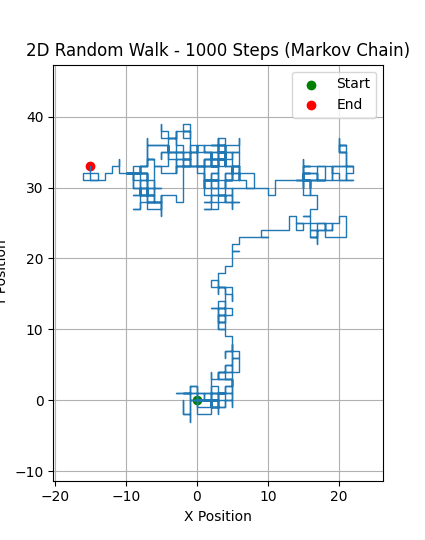
Access the variables created in the code:
🥑 print(positions) -
Run a python script:
🥑 run file.py - Refresh:
🥑 /refresh - Show current variables:
🥑 /show
A guac session progresses through a series of stages, each of equal length. Each stage adjusts the emoji input prompt. Once the stages have passed, it is time to refresh. Stage 1:
🥑, Stage 2:🥑🔪Stage 3:🥑🥣Stage:4🥑🥣🧂,Stage 5: 🥘 TIME TO REFRESH. At stage 5, the user is reminded to refresh with the /refresh macro. This will evaluate the session so farand suggest and implement new functions or automations that will aid in future sessions, with the ultimate approval of the user. -
-
/help: Show help for commands, NPCs, or Jinxes. -
/init- Initialize NPC project-set up bare bones infra for an npc team
-
/jinxes: show available jinxes for teamJinxes are Jinja execution templates that let users develop small programs that can build on each other and reference each other through jinja templating. Jinx methods allow us to give smaller LLMs the scaffolding to perform
tool calling, so to speak, reliablyAvailable Jinxes: --- Jinxes for NPC: sibiji --- • /bash_executor: Execute bash queries. • /calc: A jinx to simplify and evaluate mathematical expressions (/calc 1+5, /calc 47233*234234) • /data_pull: Execute queries on the ~/npcsh_history.db to pull data. The database contains only information about conversations and other user-provided data. It does not store any information about individual files (/data_pull 'select * from conversation_history limit 10') • /file_editor: Examines a file, determines what changes are needed, and applies those changes. (/file_editor filename.py 'instructions for carrying out the editing') • /image_generation_jinx: Generates images based on a text prompt. (/image_generation_jinx 'prompt for llm' output_name ) • /internet_search: Searches the web for information based on a query in order to verify timiely details (e.g. current events) or to corroborate information in uncertain situations. Should be mainly only used when users specifically request a search, otherwise an LLMs basic knowledge should be sufficient. ( /internet_search 'cost of cubs tickets' ) • /local_search: Searches files in current and downstream directories to find items related to the users query using fuzzy matching. (/local_search 'class NPC') Returns only relevant snippets (10 lines around matches) to avoid including too much irrelevant content. Intended for fuzzy searches, not for understanding file sizes. • /python_executor: Execute scripts with python. Set the ultimate result as the "output" variable. It must be a string. Do not add unnecessary print statements. (/python_executor 'import numpy as np; print(np.arange(1000))') • /screen_capture_analysis_jinx: Captures the whole screen and sends the image for analysis (mostly redundant with /ots.) -
Skills: Knowledge-content jinxes
Skills are jinxes that serve instructional content. They live in
jinxes/skills/and are invoked like any other slash command:/debugging # All sections /debugging -s reproduce # Just the reproduce section /debugging -s list # Available section names /code-review -s correctness # Correctness checklist /git-workflow -s commits # Commits sectionSkills are assigned to agents through the same
jinxes:list in.npcfiles. See the Skills guide for authoring details and the two supported formats (SKILL.md folders and .jinx files). -
/ots: Over-the-shoulder screen shot analysis- Screenshot analysis:
-
/plan: set up cron jobs: -
- ##/plonk: Computer use:/pti: a reasoning REPL loop with interruptionsOr from the bash cmd line:

-
/rag: semantic similarity retrieval with database, knowledge graph, files- perform a search through chroma db, optional file input, or through the KG.
/rag  'marcus aurelius'
----------------------------------------------------------------------------------------------------
1. [419.11] The "Aeneid" is an epic poem written by the Roman poet Virgil, composed between 29 an... (2025-02-20)
2. [442.40] The "Aeneid" is an epic poem written by the Roman poet Virgil between 29 and 19 BCE. ... (2025-02-20)
3. [459.75] describe to me the aeneid in length (2025-02-20)
4. [465.52] config.py README.md (2025-03-20)
5. [478.31] caug (2025-03-13)
6. [478.99]  Error: To https://github.com/cagostino/npcsh.git 33818e6..dda... (2025-04-15)
7. [481.40] Error executing slash command 'guac': enter_guac_mode() got an unexpected keywor... (2025-06-11)
8. [482.24] Error processing command 'hey whats on at the movies in bloomington?...': name '... (2025-05-09)
9. [483.88] /home/caug/.pyenv/versions/3.11.0/envs/npcsh/bin/python /home/caug/npcww/udacity/cd14... (2025-05-13)
10. [487.71] The moon hung heavy, a bruised silver coin in the velvet sky. It didn’t shine with wa... (2025-08-05)
11. [488.20] Error executing slash command 'guac': guac_handler() takes 0 positional argument... (2025-06-11)
12. [489.30] Error executing slash command 'help': help_handler() takes 0 positional argument... (2025-05-04)
13. [489.48]  Error: To https://github.com/cagostino/npcsh.git 277fce7..cc3... (2025-04-14)
14. [492.28]  Error: To https://github.com/cagostino/npcsh.git 8d1ab34..a21... (2025-03-01)
15. [492.35]  Error: Successfully rebased and updated refs/heads/ma... (2025-03-01)
Based on the knowledge base results, I can see you're asking about Marcus Aurelius, but the search returned information about Virgil's "Aeneid" instead. Let me connect these for you: Marcus Aurelius was a Roman emperor (161-180 AD) and Stoic philosopher, while the "Aeneid" is Virgil's epic poem about the founding of Rome. Though from different eras, they're both central figures in Roman intellectual history. The "Aeneid" (as detailed in the search results) explores themes of duty, fate, and leadership - concepts that Marcus Aurelius would later grapple with in his philosophical work "Meditations." Both works reflect Roman values of pietas (duty/piety) that were central to Roman identity. Would you like me to: • Search more specifically for Marcus Aurelius in the knowledge base? • Explain the connection between Stoic philosophy (which Marcus Aurelius practiced) and the values expressed in the Aeneid? • Provide information about Marcus Aurelius based on general knowledge? The search seems to have focused on Roman literature rather than the specific philosopher-emperor you asked about.
- perform a search through chroma db, optional file input, or through the KG.
-
/roll: your video generation assistant- use local models to generate videos!
-
/sample: one-shot sampling from LLMs with specific parameters -
/search: use an internet search provider -
/serve: serve an npc team -
- ##/set: change current model, env params/sleep: prune and evolve the current knowledge graph - ##/spool

-
Enter chat loop with isolated context, attachments, specified models/providers:
-
Trigger: schedule listeners, daemons
-
/vixynt: Image generation and editing:npcsh /vixynt 'an image of a dog eating a hat' /vixynt --output_file ~/Desktop/dragon.png "A terrifying dragon" /vixynt "A photorealistic portrait of a cat wearing a wizard hat in the dungeon of the master and margarita" -w 1024. height=1024 /vixynt -igp ollama --igmodel Qwen/QwenImage --output_file /tmp/sub.png width=1024 height=512 "A detailed steampunk submarine exploring a vibrant coral reef, wide aspect ratio" -
/wander: daydreaming for LLMs

A system for thinking outside of the box. From our testing, it appears gpt-4o-mini and gpt-series models in general appear to wander the most through various languages and ideas with high temperatures. Gemini models and many llama ones appear more stable despite high temps. Thinking models in general appear to be worse at this task.
- Wander with an auto-generated environment
- Specify a custom environment
-
Control event generation
-
/yap: an agentic voice control loop

- an agentic voice control loop with a specified agent. When launching
yap, the user enters the typicalnpcshagentic loop except that the system is waiting for either text or audio input. - voice chat:
Compilation and NPC Interaction
Compile a specified NPC profile. This will make it available for use in npcsh interactions.
You can also use/com as an alias for /compile. If no NPC file is specified, all NPCs in the npc_team directory will be compiled.
Begin a conversations with a specified NPC by referencing their name